


Table of Contents
So you fired up your BMW the other day and your navigation sent you down a road that no longer exists. Or it missed a new highway entirely. And you sat there thinking wait how old is this map anyway?
That’s the moment most BMW owners start asking what is the latest BMW map version and whether they’ve been driving around with outdated map data for longer than they’d like to admit. Honestly it happens more than people think. The BMW navigation system doesn’t update itself the way your phone does. It needs a proper map update and if you haven’t done one in a while you’re probably missing a lot.
The good news is the process is a lot simpler than the dealer makes it sound. And it’s nowhere near as expensive either.

What Is the Latest BMW Map Version in 2026?
The latest map version available right now is BMW NEXT 2025 for North America. It was just released and it covers BMW models from older iDrive setups all the way through the newer EVO and NBT Evo ID5/ID6 systems. If you’re still running something from 2024 or earlier you’re already a version behind.
BMW maps 2026 planning is already underway on the backend but NEXT 2025 is what’s live and what you should be getting on your vehicle right now.
Here’s the thing. A lot of people assume their BMW navigation map stays current on its own. It doesn’t. The software inside your iDrive holds a static snapshot of road data from whenever the last update was done. New roads get built. Old ones change. POI listings like restaurant locations and station stops shift constantly. None of that finds its way into your system without a proper map update.
BMW map updates work on a regional basis. So if your vehicle was originally sold in another country and the maps were set for that region you’ll actually need a region change before a standard update will work correctly. That’s something BimmerNaviUpdates.com handles remotely which is a nice option to have.
BMW Map Version History From Premium to NEXT
To really answer what is the latest BMW map version for your specific car it helps to see where things have been. Here’s a quick look at recent versions and what systems they work with.
| Map Version | Year | Compatible Systems | Region |
|---|---|---|---|
| NEXT 2025 | 2025 | NBT Evo ID5/ID6 | North America and Europe |
| EVO 2024 | 2024 | NBT Evo ID4 | Europe / North America |
| Way 2024 | 2024 | NBT and NBT Evo | Multiple |
| Route 2024 | 2024 | CIC and NBT | Europe |
| Live 2024 | 2024 | NBT Evo | Europe |
| Premium 2023 | 2023 | CIC / NBT | North America / Europe |
If your system is running anything older than EVO 2024 you’re missing meaningful road and data changes. And if you’re still on Premium 2023 the gap is pretty significant by now.
Which BMW Models Support the BMW Map Update 2026?
Most BMW and Mini vehicles built from around 2010 onward can take a current map update. That includes the 1 through 8 Series and the full X lineup from X1 to X7 and the Z3 and Z4 and Z8 and the electric side with i3 and i4 and i5 and i7 and iX. Mini Cooper is also fully supported which a lot of Mini owners don’t realize.
For BMW G31 navi update 2026 specifically that’s the 5 Series Touring built on the G platform the compatible software path runs through the NBT Evo system. You can grab the right map data directly from the BMW 5 Series map update page at BimmerNaviUpdates.com. It’s VIN specific so you’re getting exactly what your vehicle needs and nothing else.
And that part matters more than people give it credit for. Buying a generic map file that isn’t matched to your VIN can cause installation issues or worse leave your navigation in a broken state mid process.
How to Check Your Current BMW Map Version
Before you buy anything just confirm what version your car is running.
- Start the car and open the iDrive menu
- Go to Navigation then Settings
- Look for Map Version or Software Info
- Note the version name and year
If what you see is older than NEXT 2025 or EVO 2024 it’s time to get the BMW next map update done.
USB or Download How Does the BMW Map Update Actually Work?
There are two ways to go about the map update process and both are pretty painless.
The first is the download method. You place your order and by default we send you a download link via email shortly after your purchase. You pull the file from the link save it to a formatted USB drive and plug it into your BMW. The whole thing is about as straightforward as transferring photos from your phone to a computer. Minutes depending on your last update the system will work through the installation and confirm the new map version when it’s done.
The second option is the USB map update where a pre loaded USB drive ships directly to you. It works as a plug and play solution. No download needed. The drive arrives and you insert it into the USB port in your car follow the on screen prompt and let the system do the rest. The USB process tends to take anywhere from 5 to 30 minutes depending on how much data needs to be written.
Plain and simple both options work well. The download is faster if you want it done today. The USB option is better if you’d rather not deal with file transfers at all and just want something that’s ready to install the moment it arrives at your doorstep.
For BMW map updates on USB the drive comes pre formatted and the map data is already loaded so there’s no chance of a file format error on your end. That alone is worth it for a lot of people.
What Is an FSC Code and Why Do You Need One?
This is the part most people miss. Your BMW won’t just accept a map file dropped onto a USB drive. The system checks for a valid FSC code first. FSC stands for Feature Software Code and it’s essentially a license tied to your VIN that tells your BMW navigation which map version and region it’s allowed to run.
Without a matching FSC code the map update won’t go through. The iDrive will either reject the file or sit at the prompt screen waiting for a code you don’t have. Here’s where the lifetime option changes things completely.
Lifetime FSC Code Pay Once and You’re Done
The lifetime FSC code is a one time purchase. Once it’s entered into your BMW you never need to buy another code again. Future map updates only cost the price of the data itself. No recurring activation fee. No new code for each version.
That represents real savings over time especially if you’re planning to keep your BMW for several more years. Most people who do the math end up going with the lifetime option because they’re going to want at least once a year updates anyway. Check out the lifetime FSC maps option if that sounds like your situation.
The FSC code is matched to your VIN so the moment you enter it into your system it’s locked to your vehicle. The idrive accepts it and the update runs. The whole sequence from receipt of your email to completed installation can genuinely happen in an afternoon.
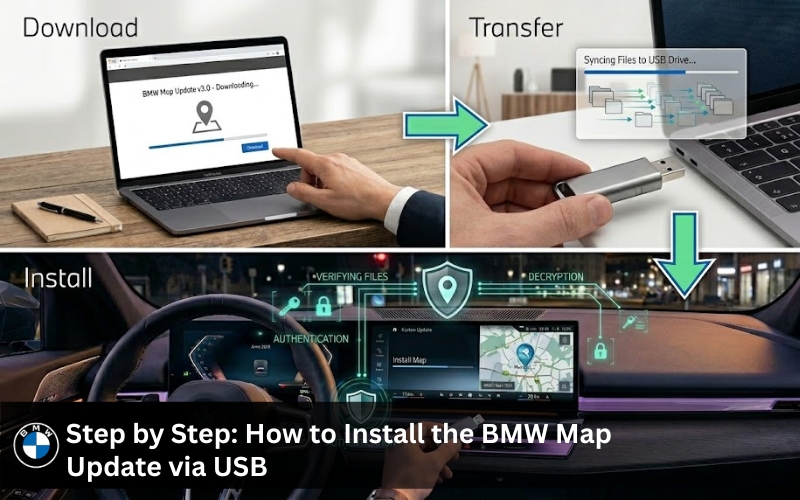
Step by Step: How to Install the BMW Map Update via USB
The map update process using BMW map update USB looks like this.
- Head to BimmerNaviUpdates.com and select your BMW model year and series
- Add your map update and FSC code to cart and complete checkout
- You’ll receive your download link and FSC code via email promptly after purchase
- Download the map file to your computer
- Transfer the file to a FAT32 formatted USB drive
- Start your BMW and insert the USB into the USB port
- Open iDrive and go to Navigation then Software Update or Map Update
- Enter the FSC code when the prompt appears
- Let the system load and install the data don’t remove the USB during this process
- The system reboots and confirms the new map version
The whole thing is straightforward and the instructions that come with your order walk you through every screen. If anything feels off just reach out. Contact us and the support team will sort it out.
How Much Does a BMW Map Update Cost? Dealer vs BimmerNaviUpdates.com
Going to the dealer for a BMW map update 2026 typically runs between $200 and $400 or more depending on your vehicle and region. That’s for a single update with no lifetime option. And you’ll need to book an appointment and leave your car for hours.
BimmerNaviUpdates.com offers the same official BMW and Mini map data at a fraction of that cost. The savings on even one update are real. And with the lifetime FSC code option the gap gets wider every model year.
| Update Type | Dealer Cost | BimmerNaviUpdates Cost | Savings |
|---|---|---|---|
| Single Map Update | $200 to $400+ | Significantly lower | $100+ |
| Lifetime FSC + Maps | Not offered | One time fee | Long term |
| USB Pre loaded Drive | Not available | Available | Convenience |
Delivery for the USB option typically takes around 2 days to arrive at your doorstep. The download version is available the moment your receipt lands in your inbox. No waiting. No appointment.
Common Mistakes When Updating BMW Maps
A few things catch people off guard during the map update process and they’re easy to avoid.
Using the wrong USB format is the most common one. The drive needs to be FAT32. NTFS won’t work. Your computer might default to NTFS for larger drives so always double check before you transfer the file.
Skipping the FSC code entirely is another. Some people think the data alone will install. It won’t. The BMW navigation system checks for a valid code before it runs anything.
Buying the wrong map region is frustrating because it means starting over. If your BMW was imported from another country and it’s coded for a European region then loading a North America map without a region change won’t give you the result you want. That region change is something you can request through BimmerNaviUpdates.com and they handle it remotely.
And don’t cut the power mid update. Pulling the USB or turning off the engine while the data is still loading can corrupt the installation and create a much bigger headache than a slow update.
What’s New in the BMW NEXT Map Update?
The BMW NEXT map update isn’t just a refresh of old road lines. The newest version brings real changes that you actually notice while driving. New highway segments that opened in the last year are in there. Station locations and restaurant stops and general POI data have been updated across millions of points. And for i series vehicles there’s improved EV charging station coverage which has gotten more accurate as the charging network has grown.
BMW also added better speed limit info pulled from current data sources. If your car has speed limit display on the instrument cluster or HUD that data only stays accurate when the map version is current. Run an old map and you might see wrong limits or none at all. It’s one of those things that sounds minor until the first time it actually affects you.
The BMW G31 navi update 2026 pulls in all of this too. The G31 5 Series Touring runs on NBT Evo and it’s fully covered by the NEXT 2025 release. Get the 5 Series update here if that’s your car.
Why BimmerNaviUpdates.com Is the Right Choice for BMW Map Updates
Updating BMW maps through a dealer costs more and takes longer. That’s just reality. BimmerNaviUpdates.com has been handling BMW and Mini navigation updates for over a decade and the feedback from customers consistently points to a few things. The data is authentic. The map version delivered matches what the BMW system expects. The process is effortless and straightforward for the vast majority of people. And when something does need a closer look the support team responds promptly.
The widget on the site makes it easy to select your BMW by model and year and the system pulls up exactly what your VIN and iDrive setup needs. There’s no guesswork about which version is right. You select it and the right map data and FSC code combination gets sent your way.
Subscription options are also available for owners who want to stay current without thinking about it. And the lifetime code option means once that activation is done you only ever pay for map data going forward. Not a bad setup for someone who plans to keep their BMW for a while.
For the full product lineup visit the BMW navigation update shop or check out the BMW map update instructions page for model specific details.
What Real BMW Owners Say
Sarah P. said the navigation update process was straightforward and everything runs smoothly now.
Mike mentioned that the new maps are much more accurate and the system feels faster overall. He lives in a growing area and said having the latest road information has helped him avoid detours on routes he drives every week.
Jack David said everything is up to date and the directions are more reliable. Not a dramatic change but absolutely worth doing to stay current.
That kind of feedback is consistent. The process works. The data holds up in real world driving. And the savings vs going through a dealer are real every single time.
Frequently Asked Questions
1. What is the latest BMW map version in 2026?
The latest map version is BMW NEXT 2025 for North America. It’s the newest release and it covers a wide range of BMW models and iDrive systems including NBT Evo ID5/ID6 and ID4. BMW maps 2026 are expected later in the year but NEXT 2025 is what’s current right now.
2. How do I download the latest BMW map update?
After purchasing from BimmerNaviUpdates.com you’ll receive a download link via email. Pull the file onto your computer and transfer it to a FAT32 formatted USB drive. Then insert the USB into your BMW and follow the iDrive prompt to start the installation.
3. What is an FSC code and do I need one to install the map update?
Yes. The FSC code is a VIN tied license that tells your BMW navigation system which map version and region it’s authorized to run. Without it the update won’t go through. You can get your FSC code along with your map data from BimmerNaviUpdates.com as a bundle.
4. Will the BMW map update work on my 2024 X5 or G31 5 Series?
Yes. Both are supported. The BMW G31 navi update 2026 runs through NBT Evo which is fully compatible with NEXT 2025. The X5 is also covered depending on the model year and iDrive setup. Enter your VIN or model details on the site to confirm compatibility before purchasing.
5. Is the lifetime FSC code really a one time purchase?
It is. Once you enter the lifetime FSC code into your BMW you don’t need to buy another code again. Future BMW map updates only require the map data file itself. No additional activation fee and no new code per version.
6. How long does the BMW map update via USB take?
The USB map update typically takes between 5 and 30 minutes depending on your previous map version and how much data has changed since your last update. The USB stays in the USB port the whole time and the system confirms completion on screen automatically.
7. Can I update my Mini Cooper navigation with the same service?
Yes. BMW and Mini navigation updates are both available through BimmerNaviUpdates.com. The Mini Cooper uses compatible BMW iDrive architecture and the map data works the same way. Confirm your Mini model and model year before selecting your version.
8. Does BMW navigation update automatically?
No. Your BMW navigation map does not update on its own the way a phone does. The BMW navigation system holds a fixed snapshot of map data from the last time an update was done. You need to manually run a BMW map update using a USB drive or the download method to get the latest version loaded into your iDrive.
9. How do I know if my BMW has the latest software?
Open your iDrive menu and go to Navigation then Settings and look for the map version or software info screen. Compare what you see against the latest BMW map version which is NEXT 2025 for North America right now. If your BMW navigation map shows anything older than that your vehicle is due for a map update.
10. What is the current BMW map version?
The current BMW map version for North America is BMW NEXT 2025 and it works across NBT Evo ID5/ID6 and ID4 systems. For European regions the current versions include EVO 2024 and Way 2024 depending on your BMW model and iDrive setup. You can check compatibility by entering your VIN at BimmerNaviUpdates.com.
Get the Latest BMW Map Version Today
Here’s the reality. Roads change. BMW navigation doesn’t update on its own. And going to the dealer for a BMW map update 2026 costs a lot more than it should for something you can handle yourself in an afternoon.
The BMW NEXT map update is available now. The process is effortless and straightforward. The data is authentic and matched to your VIN. And with the lifetime FSC code option you’re set for every map version that comes after this one too.
Check your BMW series and get started at BimmerNaviUpdates.com. If you have questions about your specific vehicle or region just contact us and someone will get back to you promptly.
And if you want to follow along with the newest releases and real driver feedback on BMW map updates check out the team on Instagram at bmw_navigation_updates.