


Table of Contents
If you’ve been driving your BMW 5 Series lately and the nav keeps routing you down roads that don’t exist anymore or missing motorway junctions that opened two years ago then you already know the problem. Your navigation system is running on old data and it’s making every journey a little more frustrating than it needs to be.
Here’s the thing. A BMW Map Update 5 Series isn’t just about having prettier 3D buildings on screen. It changes how your car actually routes you. New roads get picked up. Speed camera locations refresh. Your head unit stops giving you directions to a roundabout that got replaced by a flyover. It matters more than most people think. And the good part is you don’t need a dealer appointment to sort this out.
What Your BMW 5 Series Navigation System Actually Runs On
The BMW 5 Series has gone through a few generations and each one came with a different iDrive system under the hood. The older E60 and E61 models from 2003 to 2010 run on CIC or MK4 head units. The F10 and F11 that most people associate with the modern 5 Series shape use NBT. Then the G30 and G31 moved to NBT Evo with ID5 and ID6 software. The newer G60 runs on ID7.
Why does this matter? Because the map code and activation code format is different for each system. You can’t just grab any bmw map update file and expect it to work. The FSC code is tied to your specific VIN and your specific navigation version. Get that wrong and nothing installs.
That’s the part most people miss when they go looking for a bmw map update 5 series free download online. The file might be there but without the correct FSC code matched to your vehicle it won’t activate and you’ll end up with a wasted afternoon.
BMW 5 Series Navigation Compatibility at a Glance
| Generation | Years | System | Compatible Map |
| E60 / E61 | 2003–2010 | CIC / MK4 | Route / Way |
| F10 / F11 | 2010–2016 | NBT | Premium 2023 / Next |
| G30 / G31 | 2017–2023 | NBT Evo ID5/6 | EVO 2024 / Next 2025 |
| G60 | 2024+ | ID7 | Next 2025 |
So if you’re on an F10 or G30 you’re in the sweet spot right now. The latest available map versions cover those systems fully and the new software brings real improvements in routing accuracy and up-to-date road data across North America and Europe.
The FSC Code Explained Simply
A lot of BMW owners hear FSC code and immediately feel like it’s some dealer-only mystery. It’s not. It’s basically a map code that tells your idrive software that the navigation data it’s about to receive is legitimate and authorised for your specific car.
Your VIN is what links everything together. Every BMW navigation system from the NBT era onwards requires a valid activation code before it will accept a new software update. Without it the installation just stops.
Here’s where BimmerNaviUpdates.com makes this genuinely straightforward. You get a lifetime FSC code as part of the package. Enter it once and you never pay for another code again. Future bmw map refreshes only need the map data itself. That’s it. One code. Done. For the life of the car.
You can check the full FSC code and feature installer option at BimmerNaviUpdates.com if you want to see exactly what’s included before you order.
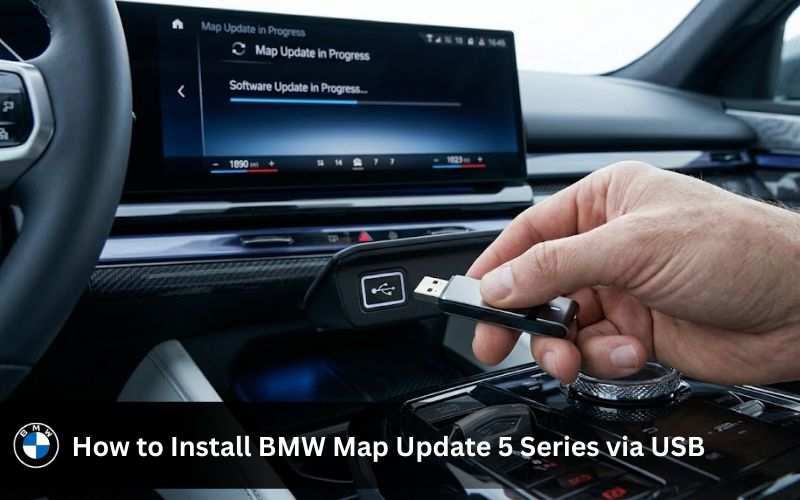
How to Install BMW Map Update 5 Series via USB
This is where people overthink it. The USB method is genuinely simple once you know the steps. The whole thing takes between 5 and 30 minutes depending on how long it’s been since your last bmw navigation update.
You’ll need a USB stick or USB drive formatted to FAT32 with at least 32GB of space. USB 3.0 is faster but USB 2.0 works too. Don’t use a slow budget drive because a write error halfway through causes problems.
Once you’ve got your order from BimmerNaviUpdates.com you get a download link by email along with the instruction guide and your FSC code.
Here’s the process from there:
- Download the BMW map file from the link in your email
- Copy it to your formatted USB drive (don’t put it in a folder and don’t rename anything)
- Sit in your car with the engine running or connected to a charger
- Insert the BMW USB stick into your car’s USB port
- Open iDrive and go to Settings then Software Update
- Select the map file that appears on screen
- Enter your FSC code when prompted
- Wait for the installation to finish without removing the USB
- Let the system reboot and check the map version under iDrive settings
And that’s genuinely it. No dealer. No booking fee. No waiting three weeks for a slot.
Do You Need BMW ConnectedDrive or the BMW Download Manager?
BMW ConnectedDrive handles some over-the-air minor updates for connected services but a full bmw map update including the core road database doesn’t come through that channel for most vehicle generations. The BMW download manager is BMW’s own desktop tool for pulling vehicle software and map files but it’s tied to your BMW account and not always straightforward for older systems.
BimmerNaviUpdates.com handles all of that on their end. You get a direct download link with the right operating system compatible file for your specific head unit already prepared. There’s no need to run the BMW download manager yourself or figure out which version matches your hardware or multimedia system.
It saves a lot of back-and-forth that honestly nobody needs when they’re just trying to update BMW maps.
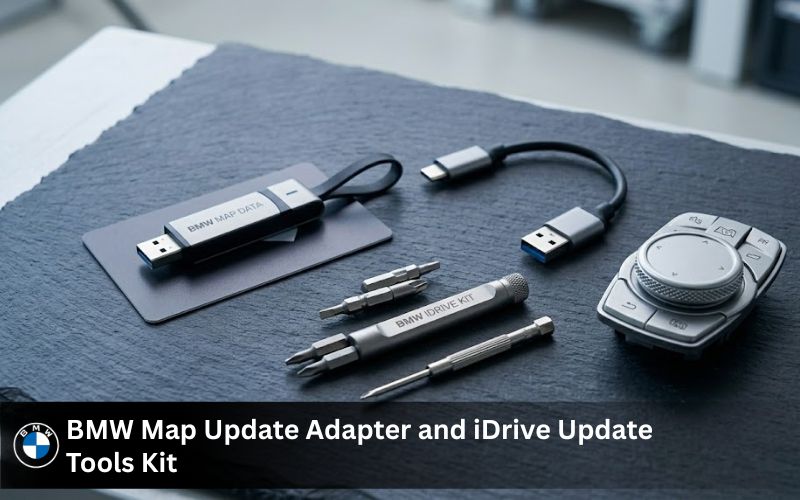
BMW Map Update Adapter and iDrive Update Tools Kit
If you’re on an older 5 Series with a CIC system or certain early F10 builds you might need a BMW map update adapter to connect the USB correctly to your system. Some older head units use a different port format and the standard full-size USB doesn’t fit without one.
The BMW map update adapter is available directly through BimmerNaviUpdates.com. Same goes for the BMW iDrive update tools kit which is a solid option if you want everything you need in one go rather than sourcing bits separately. For older models it genuinely makes the difference between a smooth install and a frustrating one.
What’s in the Latest BMW 5 Series Map Package Right Now
The latest available map versions on offer right now are Next 2025 for NBT Evo systems and EVO 2024 for compatible NBT builds. Premium 2023 is still available for older systems. Each version brings up-to-date road data and newest routing logic for your region.
North America just had a fresh release with the Next 2025 data set. European coverage is equally current. The bmw maps for your bmw include speed limit data for compatible systems which shows directly on your instrument cluster and if your car has a HUD it appears there too.
The 3D map rendering is noticeably sharper on NBT Evo systems and lane guidance on motorways is much more reliable when the road database is current. It’s one of those upgrades that changes how the car feels to use day-to-day even though nothing mechanical changed.
BMW Map Update 5 Series vs Other Series: What’s Different
If you also own or are considering a different BMW the process is largely the same across the range. The BMW navigation update 3 Series and BMW navigation update 7 Series follow identical steps with the only real difference being the specific head unit type and matching FSC code format.
The BMW i4 Series is a slightly newer platform running ID7 but the USB install method still applies and the same lifetime code logic works there too.
So if you’ve got more than one BMW in the family it’s worth knowing BimmerNaviUpdates.com covers the full range. Not just the 5 Series.
Common Mistakes That Catch People Out
Most failed installs come down to a few easy-to-avoid things. Wrong USB format is the biggest one because Windows defaults to NTFS when you format a drive and BMW systems need FAT32. The car just won’t see the file otherwise.
Downloading bmw map files from unofficial sources is the other one. The new software might look identical but without a valid activation code matched to your VIN the installation won’t complete. Some unofficial files also carry corrupted data that causes the idrive system to get stuck mid-update and that’s a worse situation than just having old maps.
And don’t remove the USB stick while the update is running. The navigation system is writing data to your hard drive during the process and interrupting it can cause errors that need a full system reset to fix.
If something does go wrong BimmerNaviUpdates.com has 24/7 chat support. They’ve seen every variation of install issue across every 5 Series generation and can walk you through it. There’s also a helpful breakdown at what to do if your BMW software update is not working if you want to troubleshoot before reaching out.
Dealer Price vs BimmerNaviUpdates.com
| Source | Typical Cost | Lifetime FSC | Support |
| BMW Dealership | £150–£300 | No | Limited hours |
| BMW ConnectedDrive | £80–£120 | No | Online only |
| BimmerNaviUpdates.com | Competitive | Yes | 24/7 Chat |
The dealer experience isn’t bad. It’s just expensive for something you can do at home in under 30 minutes with a USB drive and an email. The lifetime code alone saves money over multiple update cycles.
For a full breakdown of what dealers charge you can read the BMW software update cost guide on the blog.
What Customers Are Saying
Sarah said the whole process was straightforward and everything ran smoothly from the first go. Mike mentioned the new bmw maps are noticeably more accurate and he lives in a fast-growing area where new roads appear regularly. He said it’s made a real difference to avoiding unnecessary detours. Jack said the directions are just more reliable now and that it’s worth doing if you want your car feeling current.
These aren’t staged quotes. They’re from real people who updated their cars and came back to say so.
Frequently Asked Questions
1. Can you update maps on a BMW 5 Series?
Yes, a bmw map update 5 series can be done through USB or over the air depending on your iDrive version. I have updated mine using a USB and it worked smoothly within an hour.
2. Is it worth updating BMW maps?
A bmw map update 5 series is worth it because it improves route accuracy and adds new roads. I noticed fewer wrong turns after updating which made daily driving easier.
3. Can I update BMW software myself?
You can handle a bmw map update 5 series yourself using official files and a USB drive. With basic steps and a stable internet connection it is quite simple even without dealer support.
4. How do I update my BMW navigation maps?
To perform a bmw map update 5 series download the latest maps and transfer them via USB or use BMW connected services. I prefer USB since it gives more control during the process.
5. How often are BMW map updates released?
A bmw map update 5 series usually comes out two to four times a year depending on region. Updates for bmw navigation update 3 series and bmw navigation update 7 series follow a similar cycle.
6. How long does a BMW map update take?
A bmw map update 5 series typically takes 30 minutes to 90 minutes. In my case it finished faster while driving which is a convenient option.
7. Are BMW map updates free?
Some bmw map update 5 series options are free if your subscription is active. After expiry you may need to pay or use tools like bmw idrive update tools kit.
8. How can I check my BMW map version?
You can check your bmw map update 5 series version in the iDrive settings under navigation map info. It shows the region and year so you know if an update is needed.
9. Why is my BMW map update not working?
If your bmw map update 5 series fails it could be due to wrong files or USB format issues. I once fixed it by reformatting the drive and using a proper bmw map update adapter.
10. How do I install a BMW map update?
To install a bmw map update 5 series plug in the USB and follow the iDrive prompts. The same process works for models like bmw i4 series with slight interface differences.
Get Your BMW 5 Series Map Update Today
Driving with old maps is one of those things that feels minor until it isn’t. A missed road here. A wrong junction there. Your idrive software showing a petrol station that closed three years ago. It adds up.
The bmw map update 5 series process through BimmerNaviUpdates.com is fast affordable and works on every generation from E60 to G60. You get a lifetime FSC code so you never pay for activation again. You get the newest map data including Next 2025 for NBT Evo systems. And you get real support if anything comes up.
Order your BMW Map Update 5 Series now and get your navigation where it should be.